
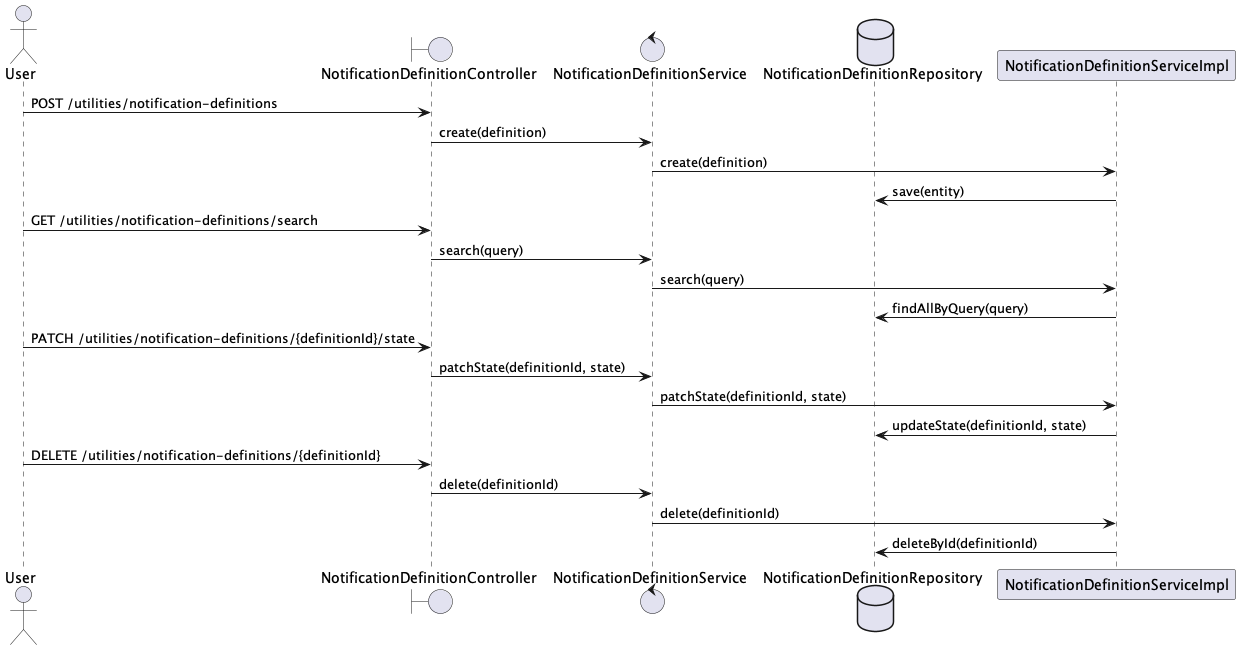
Persona 1: Admin - I have Notification Definitions
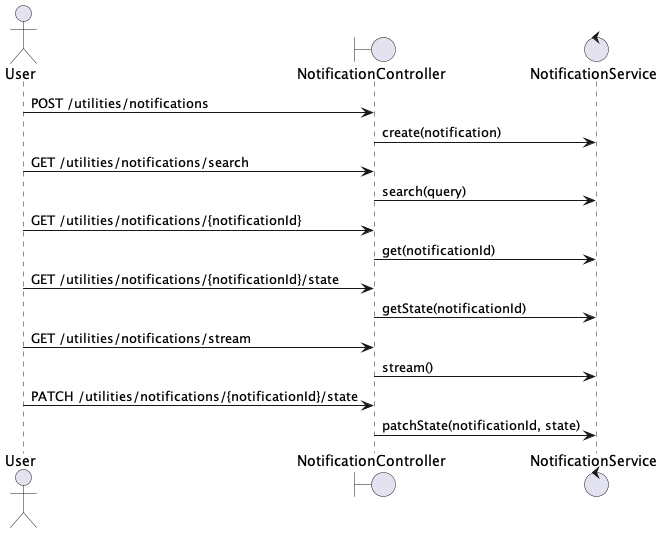
Persona 2: User - I have Notifications
Persona 1: Admin
- The admin can create and manage notification definitions for events, specifying level, schedule, state, and target organizations.
- The admin can activate/deactivate notification definitions.
- The admin can delete notification definitions.
Persona 2: User
- The user receives notifications via banners in the web app based on the definitions created by the admin.
- The user can view past notifications.
Gherkin Features
Feature: Admin Notification Definition Management
Feature: Admin Notification Definition Management
  As an Admin,
  I want to define notifications, schedule them, and ensure their delivery,
  So that users are explicitly notified about events in the application.

  Scenario: Define a notification
    Given I am an admin
    When I define a notification with the following details:
      | Title       | System Maintenance                          |
      | Message     | We will be performing system maintenance... |
      | Level       | info                                        |
      | Start Date  | 2024-06-15T10:00:00Z                        |
      | End Date    | 2024-06-15T12:00:00Z                        |
      | State       | active                                      |
      | Target Orgs | org1, org2                                  |
      | Media Types | email, SMS, banner                          |
    Then the notification definition should be saved

  Scenario: Schedule notification
    Given a notification definition exists with the following details:
      | Title       | System Maintenance                          |
      | Message     | We will be performing system maintenance... |
      | Level       | info                                        |
      | Start Date  | 2024-06-15T10:00:00Z                        |
      | End Date    | 2024-06-15T12:00:00Z                        |
      | State       | active                                      |
      | Target Orgs | org1, org2                                  |
      | Media Types | email, SMS, banner                          |
    When the start date is reached
    Then notifications should be generated for each media type
    And the notifications should be saved to the database

  Scenario: Delete a notification definition
    Given I am an admin
    And a notification definition exists with the title "System Maintenance"
    When I delete the notification definition
    Then the notification definition should be removed from the database
    And no future notifications should be generated from this definition
Feature: Notification delivery
Feature: Notification delivery
  As a user,
  ...

  Scenario: Deliver notifications
    Given notifications are generated and saved in the database
    When the current time is within the notification schedule
    Then notifications should be delivered to users via the following media:
    | Media Type |
    | email      |
    | SMS        |
    | banner     |
OPEN ISSUE
Single Notification Document for All MediaPros:
- Simpler Data Model: One document per notification simplifies data management.
- Easier Updates: Changes to the notification (e.g., content updates) only need to be made in one place.
- Less Storage Overhead: Storing a single document reduces the amount of data stored.
Cons:
- Complexity in Handling Media-Specific Data: If different media require different data formats or additional metadata, the document can become complex.
- Processing Logic: Notification delivery logic needs to handle multiple media types, potentially leading to more complex code.
Separate Notification Document for Each Media
Pros:
- Flexibility: Each document can be tailored to the specific needs of each media type (e.g., email, SMS, banner).
- Isolation: Issues with one media type (e.g., email service outage) do not affect others.
- Simpler Delivery Logic: Each notification document is specific to a single media, simplifying delivery processing.
Cons:
- Data Duplication: Information common to all media types (e.g., notification content) is duplicated across documents.
- Increased Storage: More documents mean increased storage requirements.
- Update Complexity: Updates to notification content must be applied to all relevant documents, increasing the complexity.
Implementation details
From the technical point of view, our system works with two main objects: NotificationDefinition and Notification.
For both of them we have a dedicated REST controller, which allows certain operations. Here are links to the Swagger:
Globally, it works this way: when application admin creates a notification, he creates a NotificationDefinition, which is stored in notification_definitions collection in database. Next, we have two different scenarios.
Notification is not scheduled
It means, that when admin saves a notification, all targets should receive it immediately. In that case, on BE we receive an instance of NotificationDefinition class, with all the required details, and after we save definition itself, we also populate notifications collection. Relation is the following: one notification instance is created for single target and single media.
For example, if the definition has two target users and three channels for notification delivery, we will create six notification instances. Link to the definition is definitionId field.
Notification is scheduled
It means, that when admin saves a notification, all targets will receive it when schedule.start date comes. Here we have the following flow: admin creates a definition, then MongoDB trigger fires on Insert operation and creates a sub-copy of the definition in a helper collection called notifications_ttl. Also, the same trigger handles definition deletion, so when we remove definition from the database, we clear the helper collection too.
This sub-copy contains a start date from the schedule, and has a Mongo TTL index on it. _id of the sub-copy is equal to the original definition _id. So, when the specified date comes, sub-copy of definition gets removed from the notifications_ttl collection.
On BE we are listening to the change stream on that collection, filtering on operation type == DELETE. When we capture the required ChangeEvent, we load definition by _id (changeEvent.raw.documentKey in that specific case) and populate notifications collection with notification instances.
IMPORTANT: objects in notification collection are immutable except of state. It means, that on PUT request to NotificationDefinitionController we fully delete all instances of that definition in notifications collection and recreate them from scratch with the INITIAL state.
Data Model
NotificationDefinition {
    id,
    organisations,
    schedule,
    state // ACTIVE, INACTIVE
}

NotificationTTL {
    id,
    start
}

Notification {
    id,
    notificationDefinitionId,
    organisation,
    state, // SENT, RECEIVED, ACKNOWLEDGED
    user
}
NotificationDefinition {
    {
        id: 001,
        organisations: [org1, org2],
        schedule: { start: '2024-06-17 08:00', end: '2024-06-17 17:00' },
        state: ACTIVE
    },
    {
        id: 002,
        organisations: [org3, org4],
        schedule: { start: '2024-06-18 08:00' },
        state: ACTIVE
    }
}

NotificationTTL {
    {
        id: 001, start: '2024-06-17 08:00'
    },
    {
        id: 002, start: '2024-06-18 08:00'
    }
}

// At '2024-06-17 08:00' => Notification gets published
Notification {
    {
        id: 010,
        notificationDefinitionId: 001,
        organisation: org1,
        schedule: { start: '2024-06-17 08:00', end: '2024-06-17 17:00' }
    },
    {
        id: 020,
        notificationDefinitionId: 001,
        organisation: org2,
        schedule: { start: '2024-06-18 08:00' }
    }
}

// At '2024-06-17 08:30' => User1 from org1 is logged-in
Notification {
    {
        id: 010,
        notificationDefinitionId: 001,
        organisation: org1,
        schedule: { start: '2024-06-17 08:00', end: '2024-06-17 17:00' }
    },
    {
        id: 020,
        notificationDefinitionId: 001,
        organisation: org2,
        schedule: { start: '2024-06-18 08:00' }
    },
    {
        id: 030,
        notificationDefinitionId: 001,
        organisation: org1,
        schedule: { start: '2024-06-17 08:00', end: '2024-06-17 17:00' },
        user: user1,
        state: SENT
    },
}

// At '2024-06-17 08:30' => Few milliseconds after User1 from org1 is logged-in
Notification {
    {
        id: 010,
        notificationDefinitionId: 001,
        organisation: org1,
        schedule: { start: '2024-06-17 08:00', end: '2024-06-17 17:00' }
    },
    {
        id: 020,
        notificationDefinitionId: 001,
        organisation: org2,
        schedule: { start: '2024-06-18 08:00' }
    },
    {
        id: 030,
        notificationDefinitionId: 001,
        organisation: org1,
        schedule: { start: '2024-06-17 08:00', end: '2024-06-17 17:00' },
        user: user1,
        state: RECEIVED
    },
}
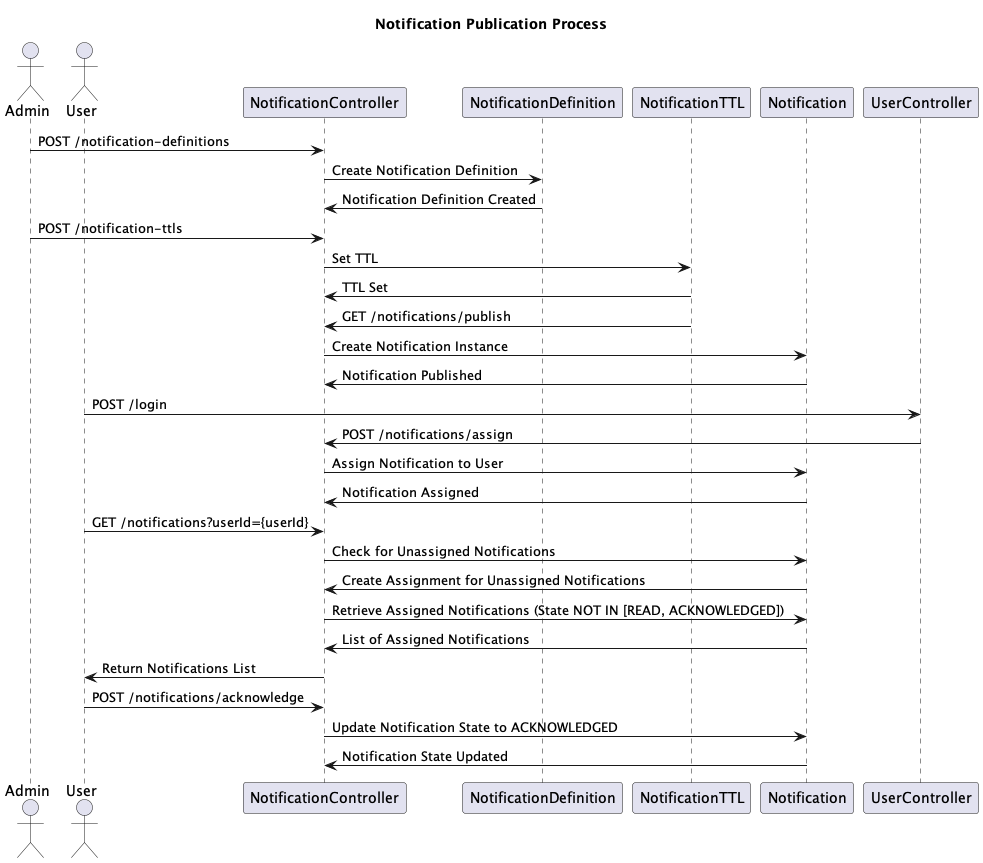
Potential mongo query
Find notifications that the user is not yet assigned to and create new assignment records if necessary.
db.notifications.aggregate([
  {
    $lookup: {
      from: "user_notifications",
      let: { notificationId: "$_id" },
      pipeline: [
        { $match: { $expr: { $and: [{ $eq: ["$notificationId", "$$notificationId"] }, { $eq: ["$userId", userId] }] } } }
      ],
      as: "userNotification"
    }
  },
  {
    $match: {
      "userNotification": { $eq: [] } // No assignment found
    }
  },
  {
    $addFields: {
      userId: userId,
      state: "SENT",
      assignedAt: new Date()
    }
  },
  {
    $merge: {
      into: "user_notifications",
      on: "_id",
      whenMatched: "fail",
      whenNotMatched: "insert"
    }
  }
]);
- $lookup: Join notifications with user_notifications to find which notifications are not yet assigned to the user.
- $match: Filter out notifications that have already been assigned to the user (i.e., userNotification array is empty).
- $addFields: Add fields to prepare for insertion into user_notifications collection (assigning the notification to the user).
- $merge: Merge the new assignment records into user_notifications collection, inserting new records if they don't already exist.