Life ConnectLife Connect
Wiki index
Architecture
Services
Concepts
Runbooks
Infra
Swagger Docs
GitHub
Wiki index
Architecture
Services
Concepts
Runbooks
Infra
Swagger Docs
GitHub
  • Archive
  • Data Dictionary
  • Functional Epics

    • DICTIONARY OF ATTRIBUTES
    • Search Condos
    • Display

      • DisplayAll

        • Display all - Contracts
        • Display all - invoices
        • Display all - parts
        • Display all - Persons Relationships
        • Display all - Persons
        • Display tickets
      • DisplayContract

        • Display bank account Contract
        • Display Condo Member Contract
        • Display contact contract
        • Display Employee Contract
        • Display Generic Contract
        • Display Insurance Contract
        • Display Legal Represent Contract
        • Display Oral Contract
        • Display Owner Contract
        • Display Condo Regulation Contract
        • Display rental Contract
        • Display Supplier Contract
        • Display Trustee Contract
      • DisplayDelegate

        • Display Delegate
      • DisplayHistory

        • Display history
      • DisplayPerson

        • Display Company Person
        • Display Condo Person
        • Display Division Person
        • Display Group Person
        • Display Indivision Person
        • Display Natural Person
        • Display Union Person
        • Display Unknown Person
      • DisplayPersonsContracts

        • Display all Interventions
      • DisplayProperty

        • Display part
        • Display part
      • UiPerson

        • Display "mini" Persons
    • Process

      • Create

        • Create property & condo
      • Delete

        • Delete objects according to state machine
      • RC Renewal

        • RC RESIDENTIAL - automatic renewal
      • Review

        • rent amount review - RC residential - creation
        • rent amount review - RC residential - take-over
      • Sell

        • Sell a unit
    • Reporting

      • GRR

        • GLOBAL RENT REPORT
    • Search

      • Search
    • StateMachine

      • CreatingContract

        • State machine - creating a rental contract
        • State machine - creating a rental delegate contract
        • State machine - Referencing a abstract part contract
        • State machine - Referencing a bank contract
        • State machine - Referencing a condo regulation contract
        • State machine - Referencing a contact contract
        • State machine - Referencing an employee contract
        • State machine - Referencing a generic contract
        • State machine - Referencing a legal represent contract
        • State machine - Referencing a owner contract
        • State machine - Referencing a rental contract
        • State machine - Referencing a supplier contract
        • State machine - Referencing a trustee contract
      • CreatingIntervention

        • State machine - creating a ticket
        • State machine - Referencing a message
      • CreatingInvoice

        • State machine - creating a incoming (supplier) invoice
      • CreatingPayments

        • State machine - creating an incoming payment
      • EncodingPart

        • CreatingPart

          • State machine - Referencing part relationships
          • State machine - Referencing a part
      • EncodingPerson

        • CreatingAddresses

          • State machine - Creating email address
          • State machine - Creating phone address
          • State machine - Creating postal address
          • State machine - Creating web address
        • CreatingPerson

          • State machine - Referencing a company person
          • State machine - Referencing a condo person
          • State machine - Referencing a division person
          • State machine - Referencing an group person
          • State machine - Referencing an indivision person
          • State machine - Referencing a natural person
          • State machine - Referencing a union person
        • CreatingShareHolders

          • State machine - valuing a shareholder
      • Scanning

        • State machine scanning - analyze a document
        • State machine scanning - matching a document
        • State machine scanning - encoding a document : related information
    • Utility

      • Allocation keys
      • Company settings
      • Document data & file
      • Revision Index
    • Validations

      • Shareholders validation
  • Implicit

    • Callback

      • Logging In
  • ProductBoard

    • Rental Process

      • Rental delegate process
    • Ticketing

      • Create a ticket - link a ticket in Outlook add-in - add a call - display a ticket
      • Display Person Info in Outlook add-in
  • Technical Epics

    • Indexation Feature Documentation
    • Rent Amount Management Feature Documentation
    • I have an API
    • I can store the balance of an account
    • I Have Person Notifications
    • 🧩 System Process Diagrams
    • The Team has a DEV environment
    • The Team is organized
    • Accounting

      • Re-generation of Invoices
      • I can call the rent for my Rental Contract
      • Payment Creation Strategy Feature Documentation
      • I Can Revese

        • Payment Reversal
      • I Have Invoices

        • I have direction on invoice's item level
      • I Have Subsidies

        • I Can Receive Family Allowance Payments - Technical Documentation
        • Subsidies + Direct Debit Documentation
    • Communication Module

      • Communication module
    • Contracts

      • I can have contract guarantors
      • API Models
      • I Have Call For Rent Process

        • Call For Rent (CFR) Process Documentation
      • Occupancy Compensation

        • **OCCUPANCY COMPENSATION Documentation**
      • State Machine

        • I can have the Rental Contract state machine
    • Database

      • Database Indexes
    • E2e Testing

      • I can create an E2E dataset
    • Env Setup

      • Adapt env to stateless UI build
      • Blockhound
      • Table of Environments and Their Specifications
      • Environment How-To
      • Java Flight Recorder Management Documentation
      • Local Environment Setup
      • Kubernetes Logs Retrieval Documentation
      • Monitoring
      • I can create a new organisation
      • Production Environment Configuration
      • Remote Environment Setup
      • Set up of separate DB for env
      • Terraform Aws S3 Buckets
      • adb-ui Service Version Update
    • Files

      • I can have tags for files
    • Globals

      • boundaries
      • boundaries
      • boundaries
      • boundaries
    • Messaging

      • MongoDB Trigger Model Documentation
    • Open Api

      • Swagger Documentation Guide
      • Swagger
    • Parts

      • I Have A Forecast And Actuals Module
      • I can have part equipments
    • Process

      • Pre-Meeting Questionnaire
      • I Can Release My Feature
    • Security

      • I can create and provision an organisation
      • a user is granted access to the application
    • Stress Test

      • Introduction
      • Reports

        • Introduction
        • Introduction
        • Introduction
        • Introduction
        • Introduction
        • Table of contents
    • Tickets

      • Ticket Details Functionality
    • Troubleshooting

      • Prometheus Memory Issue Handling
Last updated 2025-03-06⚠️ 1 year 3 months old — verify against current code before relying on details.

adb-ui Service Version Update

Remote Development Environment

There is a script to update the adb-ui service version in the specified remote development environment.

Prerequisites

Before running the script, ensure the following requirements are met:

  • Installed Tools: Terraform, jq, and sed must be installed on the server.
  • Permissions: The user must have the necessary permissions to access the /opt/$ENV directory.
  • Terraform Setup: Terraform configuration and modules must be correctly set up.

Note: Permissions and Terraform prerequisites are covered in the steps outlined in the Remote Environment Setup Documentation.

Running the Script

1. Connect to the Server

SSH into an OVH Virtual Private Server (VPS):

ssh user@your-vps-address

2. Locate the Script

On the server the script is located at:

/opt/devops/$ENV/adb-charts/scripts/upgrade_ui.sh

You can either run it from this location or copy it to your home directory for convenience.

3. Execute the Script

Run the script with two arguments: the environment and the service image tag.

Example:

./upgrade_ui.sh athena 0.61.0-SNAPSHOT-DEV-10628

Note: The service image tag can be retrieved from the service build pipeline output.

4. Implementation

The script retrieves the currently deployed service tags, replaces the adb-ui tag with the new one, and ensures the cluster state aligns with the desired configuration using Terraform.

Error Handling

The script includes basic error handling to prevent misconfigurations:

  • If the script fails to change the working directory, it exits immediately.
  • If Terraform encounters an issue, the deployment will fail and require manual troubleshooting.

Expected Output

Upon successful execution, you should see:

  • A confirmation message displaying the environment and version tag.
  • Terraform execution logs showing the applied changes.

Deploying a New Version of adb-ui in the Integration Environment

The adb-ui Bitbucket pipeline includes a step to update the adb-ui service version in the integration environment.

Executing the Deployment

1. Navigate to the Integration Branch Build

  • Click Pipelines in the left panel.
  • Filter the builds by branch, then select and open the relevant build.
  • If the build was initiated manually from the Pipelines page, you are already on the correct page.
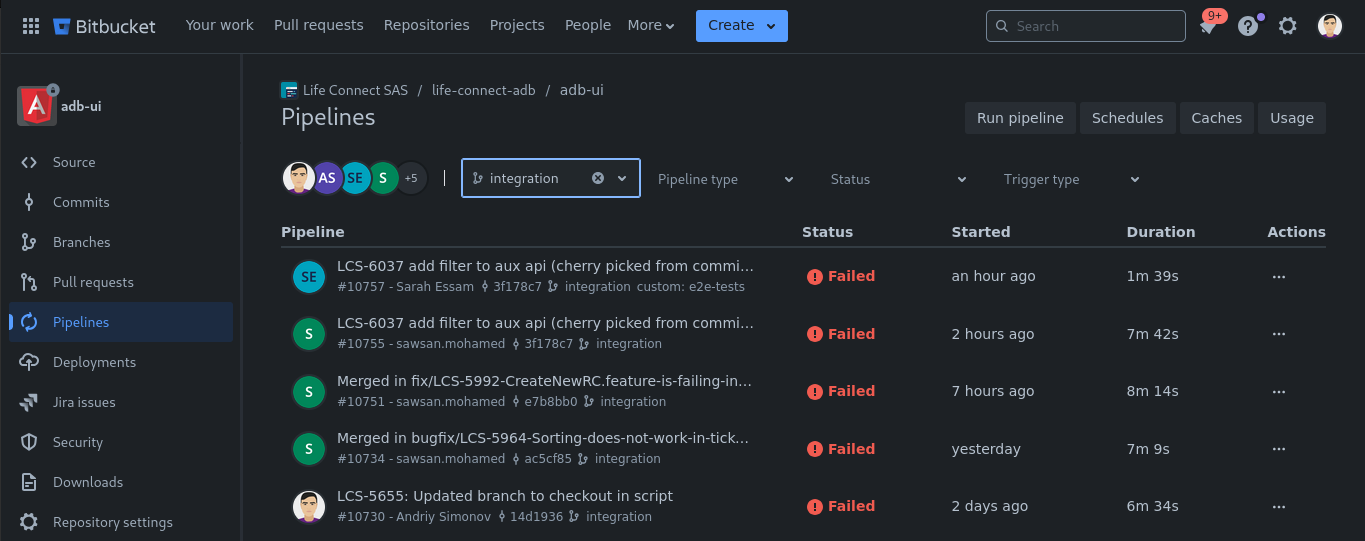
Select Integration Build

2. Run the "Deploy to Integration" Step

  • Wait for the INT Build and Push Docker Image step to complete.
  • Once completed, the Deploy to Integration step becomes enabled.
  • Click the Run button next to the step name.
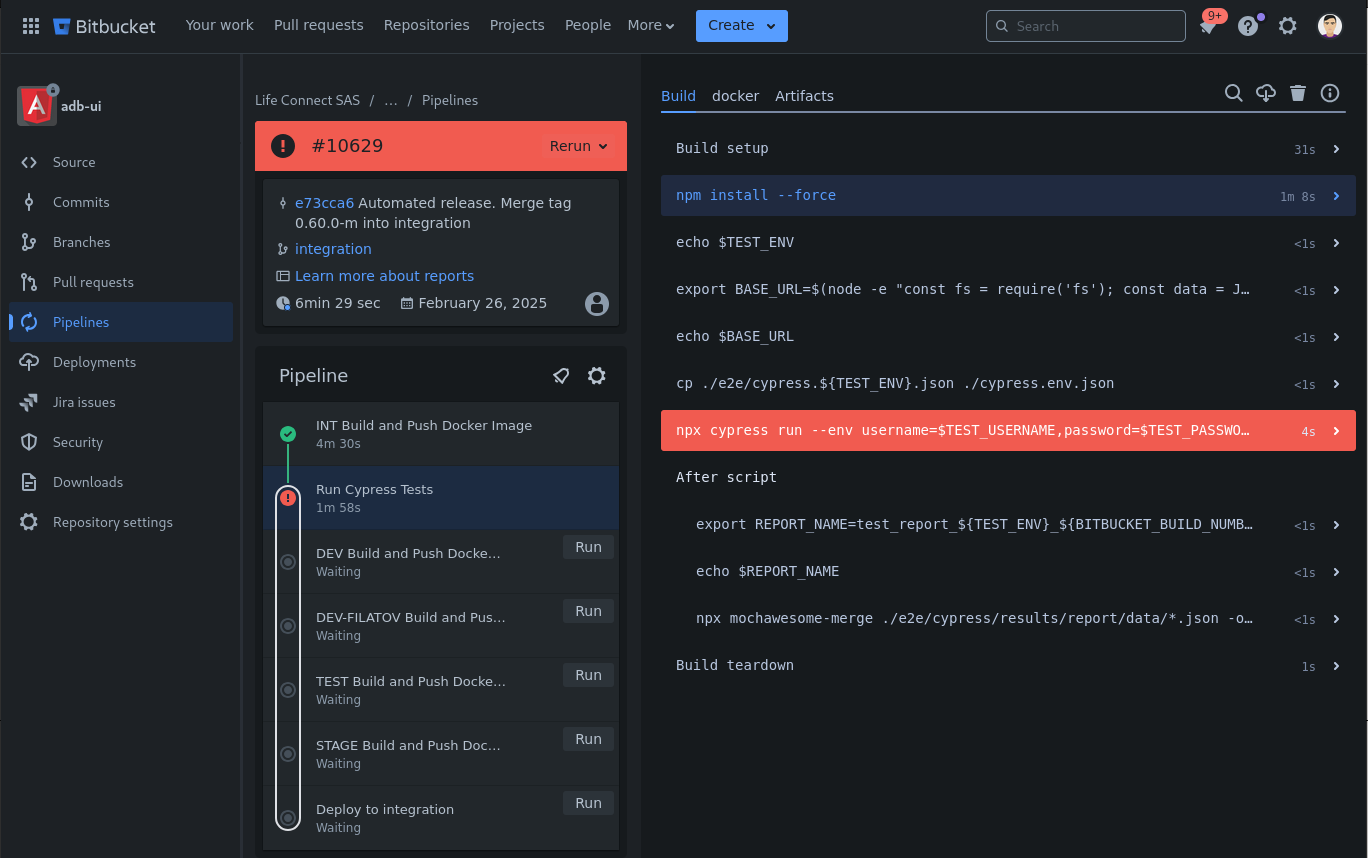
Execute Deploy to Integration Step

3. Pipeline Step Implementation

The Bitbucket pipeline for adb-ui resides in its repository in the integration branch. The deployment step is defined in the bitbucket-pipelines.yml file and follows these steps:

  • Collects build metadata (e.g., tag name).
  • Calls the deploy_int.sh script from the pipeline_scripts directory.
  • The script installs required dependencies and executes the same logic as upgrade_ui.sh.

If any issues arise, check the build logs for troubleshooting.

Edit this page
Last Updated:
Contributors: Yevhenii Khudolii
Prev
Terraform Aws S3 Buckets