Rent Amount Management Feature Documentation
Overview
The rent amount management feature involves the management of rent amounts and other associated fees within the rentAmounts field of the RentalContract class. Each rent amount has specific attributes and follows certain rules for addition, updating, and deletion.
Components
Database (adb-utilities)
- Contracts Collection: Contains rental contracts with the
rentAmountsfield, which is an array ofRentAmountobjects.
RentAmount Class
- Fields:
type: The amount type.amounts: An array ofEffectiveRentAmountobjects.
EffectiveRentAmount Class
- Fields:
amount: The price itself.lineNumber: The number of the amount in the array.whenEffective: The date from which this amount can be used.whenNoticed: The date when this value was added.whenNotified: The date when this value began to be used.nature: The type of amount (INITIAL, MANUAL, INDEXATION).state: Indicates if the value is available for update (CFR_OPEN) or locked (CFR_LOCKED).status: Indicates the status of the amount calculation (SUCCESS, WARNING, ERROR).
Process Flow
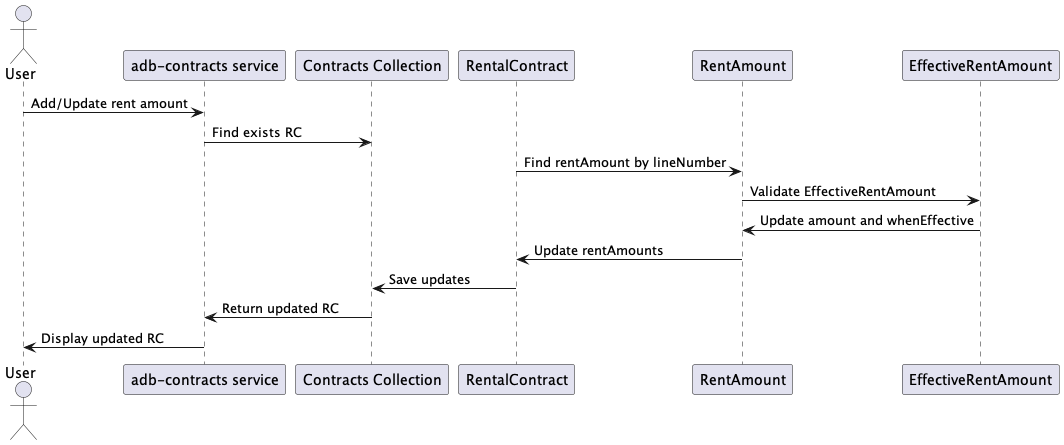
Adding/Updating a Rent Amount
- Define lineNumber: If not specified, take the last value of
lineNumber+ 1. - Search for Existing Value: Use
lineNumberto find the existing value in the array. - Check
whenEffectiveField: Ensure no other value exists in the same month if adding a new value. If updating, ensure no other value exists in the month unless it is the same month. - Nature Check: If the proposed value has
nature == INITIALand an INITIAL amount already exists in the array, do not add the new value. - State Check: When updating, ensure there are not two INITIAL values and the value is not updated if
state == CFR_LOCKED.
Update Restrictions
- Only the
amountandwhenEffectivefields are available for updating the amount.
Detailed Description
Validation Rules
Unique Month Validation:
- Ensure no two values have the same
whenEffectivemonth if adding a new value. - If updating and the
whenEffectivemonth changes, ensure no other value exists for that month.
- Ensure no two values have the same
Nature Validation:
- Prevent adding a new value with
nature == INITIALif an INITIAL value already exists. - Ensure only one INITIAL value exists in the array.
- Prevent adding a new value with
State Validation:
- Prevent updates if
state == CFR_LOCKED.
- Prevent updates if
Gherkin Features
Feature: Rent Amount Adjustments

Scenario: Add a new rent amount
Given a rental contract with an empty rentAmounts array
When a new rent amount is added with nature "INITIAL"
Then the rent amount is added to the rentAmounts array

Scenario: Prevent duplicate INITIAL rent amount
Given a rental contract with an INITIAL rent amount in the rentAmounts array
When a new rent amount with nature "INITIAL" is added
Then the system prevents adding the new rent amount

Scenario: Update an existing rent amount
Given a rental contract with a rent amount having state "CFR_OPEN"
When the rent amount is updated with a new amount and whenEffective date
Then the rent amount is updated in the rentAmounts array

Scenario: Prevent update of CFR_LOCKED rent amount
Given a rental contract with a rent amount having state "CFR_LOCKED"
When the rent amount is updated
Then the system prevents updating the rent amount

Scenario: Validate unique month for new rent amount
Given a rental contract with a rent amount in the rentAmounts array
When a new rent amount with the same whenEffective month is added
Then the system prevents adding the new rent amount

Scenario: Validate unique month for updated rent amount
Given a rental contract with a rent amount in the rentAmounts array
When an existing rent amount is updated with a new whenEffective month
And another rent amount exists in the new month
Then the system prevents updating the rent amount
PlantUML Diagrams
Sequence Diagram