
I can have contract guarantors
Overview
The Guarantor functionality allows users to add guarantors to rental contracts (RC). A guarantor is responsible for covering debts if the tenant defaults. Users can add a guarantor during the creation of a RentalContract or via a takeover process. A GuaranteeContract is created to formalize the guarantor's obligations. This contract can be signed, canceled, or updated.
Key Features:
- Add a Guarantor during RentalContract creation.
- Takeover an existing RentalContract with a new Guarantor.
- Edit Guarantor details in the draft RentalContract.
- Sign or cancel the GuaranteeContract.
- Manage multiple guarantors for a single contract.
Class Diagram
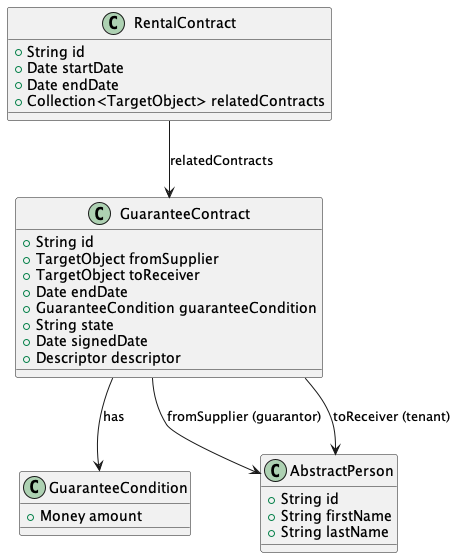
User Actions
I can add a new guarantor:
- Select or create a new PhysicalPerson via
adb-personsservice. - Provide guarantor details (endDate, guaranteeConditions).
- Select or create a new PhysicalPerson via
I can create a GuaranteeContract:
- After successfully creating an RC, the FE creates a GuaranteeContract.
- The contract includes the guarantor (fromSupplier), Tenant (toReceiver), endDate, and guaranteeConditions.
I can sign the GuaranteeContract:
- Select a signedDate.
- Upload the signed contract as a PDF.
I can cancel the GuaranteeContract:
- Transition the contract state to
CANCELED.
- Transition the contract state to
I can edit Guarantor details:
- Modify guarantor details in the draft RentalContract.
I can manage multiple guarantors:
- Add more than one guarantor to a single RentalContract.
- Ensure all guarantors’ contracts are signed or canceled before finalizing the RC.
I have a Guarantor tab:
- View all guarantor(s) details under the Guarantor tab on the RentalContract details page.